
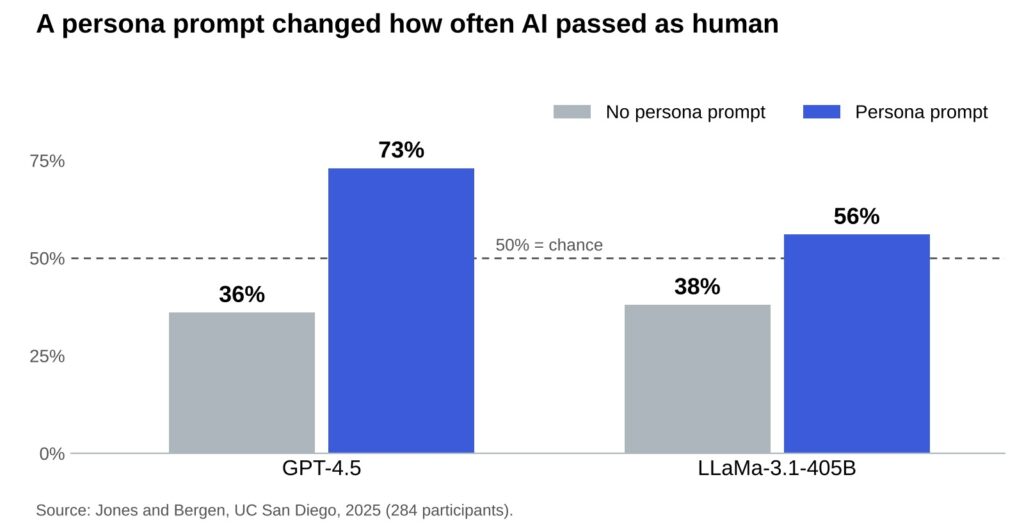
In a 2025 UC San Diego experiment, GPT-4.5 convinced people it was human just 36% of the time. Then researchers told it what kind of person to be, and that number jumped to 73%. Same model, same five-minute chats. Interrogators picked it over the actual human in the other window.
That result should change how you think about stiff AI replies. A lot of the robotic feel comes from how a conversation gets set up, and you control the setup. Below, you’ll find the habits that make a chat feel easy to talk to, the point where friendliness starts hurting accuracy, and what to do when a reply has to leave the chat and face a real reader.
What a Turing Test Reveals About Stiff AI Replies
Cameron Jones and Benjamin Bergen tested this with 284 participants (UC San Diego, 2025). Each interrogator texted a person and an AI at the same time, then named the human. The winning prompt asked the model to play a young, introverted person who knew internet culture and used slang.
The reasons people gave are more useful than the score. Linguistic style accounted for 27% of them, and interactional dynamics, such as conversational flow or dodged questions, for another 23%. Small talk came up in 61% of games. Knowledge or reasoning questions appeared in only 12%.
So people judged these chats by how they moved, far more than by what the AI knew. You probably don’t want an assistant that uses slang and acts clueless, of course. The takeaway is narrower: style and flow respond strongly to instructions.
Five Prompting Habits That Make AI Conversations Feel Natural
Describe a Specific Person Instead of a Tone
“Be friendly” gives a model almost nothing to work with. A person gives it plenty. Try: “Talk to me like a senior colleague who’s busy, likes me, and will tell me when my plan has a hole in it.” Now it knows the relationship, the pace, and how blunt to be.
Set Reply Length Before the Conversation Starts
Ask a chatbot a yes-or-no question, and you may get headers, bullets, and a recap. Nobody talks like that. Add this to your custom instructions so it carries across chats: “Reply in two or three sentences unless I ask for more. No bullet points, no summary at the end.”
Ask for One Question at a Time
Real conversations take turns. Models tend to dump five clarifying questions in one message, which feels like filling out a form. Tell it: “If you need details, ask me one question, wait for my answer, then continue.”
Show It How You Actually Write
Paste a few paragraphs of an email you wrote yourself, with private details removed. Ask the model to describe your habits first, then match them. Seeing that description lets you catch what it got wrong before it copies the mistake.
Correct the Reply Instead of Starting Over
Vague feedback gets vague fixes. “Too eager. Drop the opening compliment and get to your point” works far better than “make it sound more human,” and the correction stays in play for the rest of the thread.
| Instead of | Try | What changes |
| Sound more human | Write like a busy colleague replying on Slack | The model gets a real situation |
| Be engaging | Ask me one question before you answer | The chat starts taking turns |
| Keep it casual | Use contractions and short sentences, skip headers | The style becomes easy to check |
| Be warm | Acknowledge the problem once, then answer it | Empathy stays brief and useful |
Where Friendly Replies Start Costing You Accuracy
Here’s the catch. In a paper published in Nature in April 2026, Oxford Internet Institute researchers retrained five language models to sound warmer, then evaluated more than 400,000 responses. Warm versions were wrong 7.43 percentage points more often on average, and the gap reached 11.9 points when users expressed sadness. They were also about 40% more likely to affirm a user’s false belief.
Those models were fine-tuned, which goes deeper than typing a prompt. Still, the authors report that similar trade-offs can appear through system prompts, though they’re smaller and less consistent.
Flattery adds a second problem. A Stanford-led study in Science (Cheng et al., 2026) found that 11 leading models affirmed users’ actions 49% more often than humans did, and participants trusted the agreeable versions more. The chat that feels best might simply be the one agreeing with you. Meanwhile, 35.5% of AI users rarely or never check chatbot answers that sound confident, according to F-Secure’s April 2026 survey of 1,500 US and UK consumers.
A Standing Instruction That Protects Accuracy
Keep the relaxed tone and put a floor under it: “Be conversational, but don’t soften facts. If I’m wrong, say so and explain why. If you’re unsure, tell me.” It won’t guarantee a correct answer, so anything with real stakes still needs checking against a source.
What to Do When a Chat Reply Has to Face a Real Reader
Prompting changes how a model talks to you. An email, proposal, or post needs one more pass, because someone else will read it and judge you by it. Copying every draft into a separate tool gets old quickly, and that’s where you can add a humanizer to your AI chats.
Phrasly’s MCP server connects its humanizer and AI detector to Claude, ChatGPT, and other apps that support remote MCP servers with OAuth sign-in. You add the server URL, sign in to your Phrasly account, and call it from the thread. ChatGPT needs Developer mode turned on first.
How the Workflow Runs Inside a Thread
- Finish the substance first, including names, numbers, links, and the action you want from the reader.
- Ask the chat to humanize the draft and verify it. You’ll get the rewrite along with a before-and-after AI score.
- Compare the new version with your draft, line by line. Phrasly’s guide to editing with AI without losing brand voice covers what should survive a rewrite.
- Read it aloud, then fix anything you wouldn’t say yourself.
What to Leave Alone
Skip the humanizer for ordinary back-and-forth that only you will read. Better prompts handle that, and the tool needs at least 30 words per passage anyway. Be careful with a condolence note or an apology too, since those should come from you. And treat the score as a signal, because Phrasly itself says humanizing doesn’t guarantee any particular detector result.
Natural Should Never Mean Pretending to Be a Person
A 2024 USC study in PNAS shows why honesty gets tested here. AI-written responses made people feel more heard than human ones (5.74 versus 5.17 in the study’s ratings). Yet responses labeled as AI scored lower than those labeled human (5.13 versus 5.81).
Hiding the source might look like the obvious fix. It isn’t. If you run a customer-facing bot, tell people they’re talking to AI and give them a clear route to a person. If you send a message under your own name, make sure you’ve read it and stand behind every line. A natural voice should make a conversation easier, and nobody should feel tricked once they learn how it was written.
Treat the Setup as Part of the Conversation
The UC San Diego numbers make the case on their own: instructions alone took one model from 36% to 73%. You don’t need that kind of mimicry, though the same lever is available in every chat you open. Give the model a person to be, limit its length, make it take turns, and correct it plainly.
Then protect what matters. Ask for honesty over comfort, check the claims that carry weight, and give anything headed to a real reader a final pass in your own voice. The best AI conversations feel relaxed because someone did the careful thinking first.